
Overview
In many regions of Brazil, patients living in rural areas must travel to nearby cities to receive medical care.
This creates a logistical challenge for clinics:
This creates a logistical challenge for clinics:
• Staff must manually coordinate multiple appointments, exams, and procedures for a single patient, often within the same day
• Scheduling involves complex, interdependent variables (doctor availability, exam duration, equipment usage, insurance rules, patient data)
• Manual processes result in long phone calls, inconsistent planning, and high operational load on clinic assistants
The legacy system could not support multi-appointment coordination, causing inefficiencies for staff and long, fragmented clinic days for traveling patients.
Impact
Post-implementation feedback from the client’s internal team and early adopters indicated:
• Significant reduction in scheduling time for multi-appointment visits (based on assistant testing)
• Fewer manual errors due to constraint-driven, step-by-step data entry
• Higher scheduling success for same-day treatment bundles
• Less cognitive overload for clinic assistants managing complex flows
• Improved consistency across staff members with variable experience levels
The interface enabled clinics to serve traveling patients more efficiently while reducing operational strain on staff.

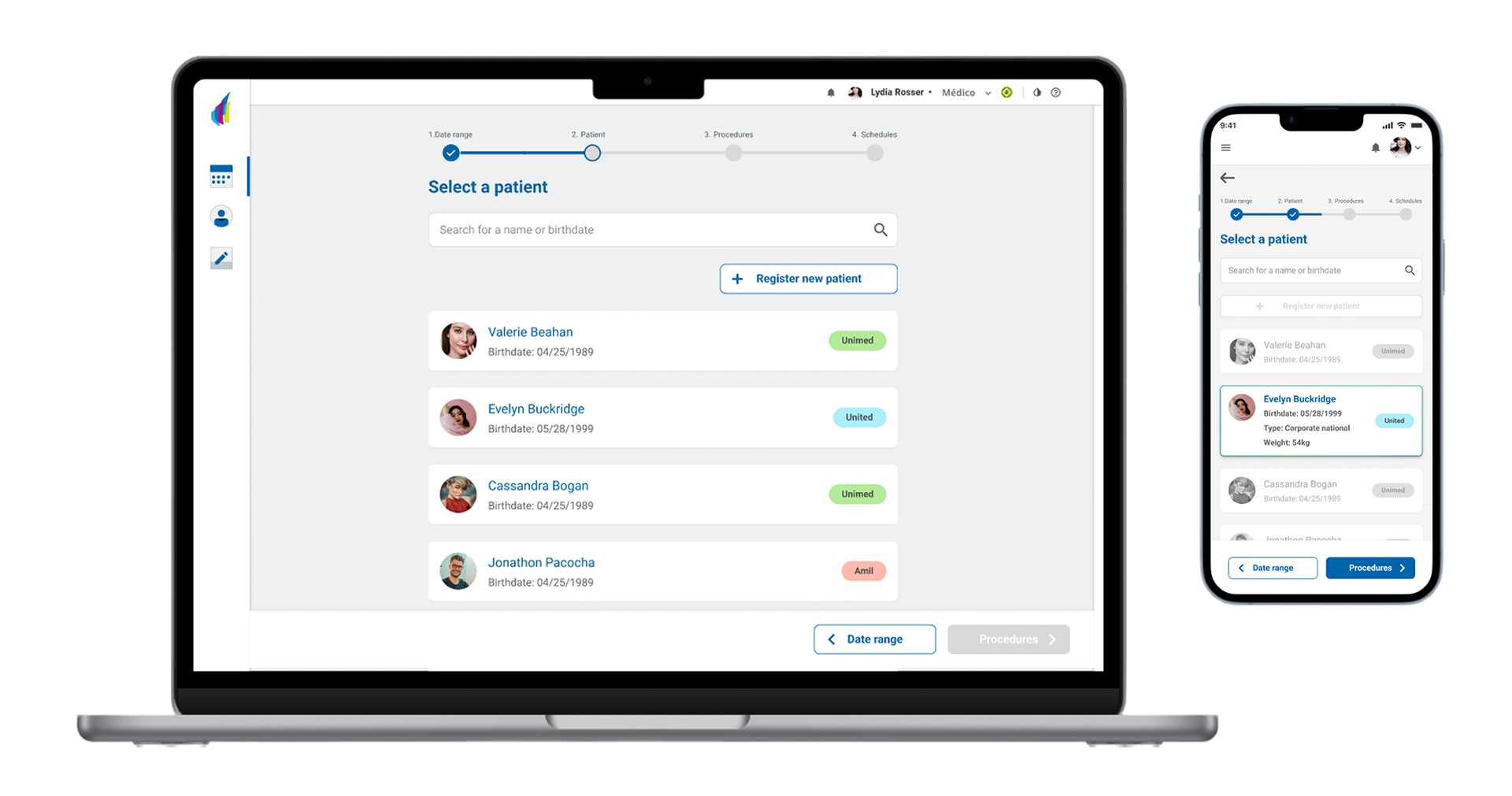
Patient entry component
My Mission
As the lead product designer, I was responsible for:
1. Understanding real-world scheduling workflows and constraints
2. Defining personas and process requirements
3. Designing a simplified, low-cognitive-load interface for complex multi-appointment scheduling
4. Creating flows, wireframes, and final UI for desktop and mobile
5. Delivering a development-ready handoff to engineering
Success meant reducing staff effort, reducing scheduling errors, and consolidating multi-step patient care into fewer trips.
Process & Strategy
User Research & Persona Definition
I conducted the initial research to understand how assistants coordinated multi-appointment days.
Key findings:
Key findings:
• Staff needed to match doctors + diagnostic equipment + exam rules in a single patient flow
• Interdependent form fields created frequent errors and forced rework
• Assistants were forced to “trial-and-error” different schedule combinations manually
• Patients traveling from rural areas pressured staff to optimize same-day availability
These insights shaped two main personas (“Suzane” – receptionist; “Marcelle” – administrative assistant).


Multiple schedule researched personas "Suzane" and "Marcelle"
Problem Decomposition & Workflow Design
The core complexity came from interdependent variables: insurance type filters eligible doctors, exam type affects available equipment, weight influences specific exam preparation, etc. To reduce cognitive load, I designed:
• A step-by-step (wizard) flow
• One decision per step to prevent overload
• Real-time validation based on the algorithmic schedule search
• Clear sequencing of patient context → exams → constraints → available schedules
This approach minimized form errors and structured the workflow around real scheduling logic.
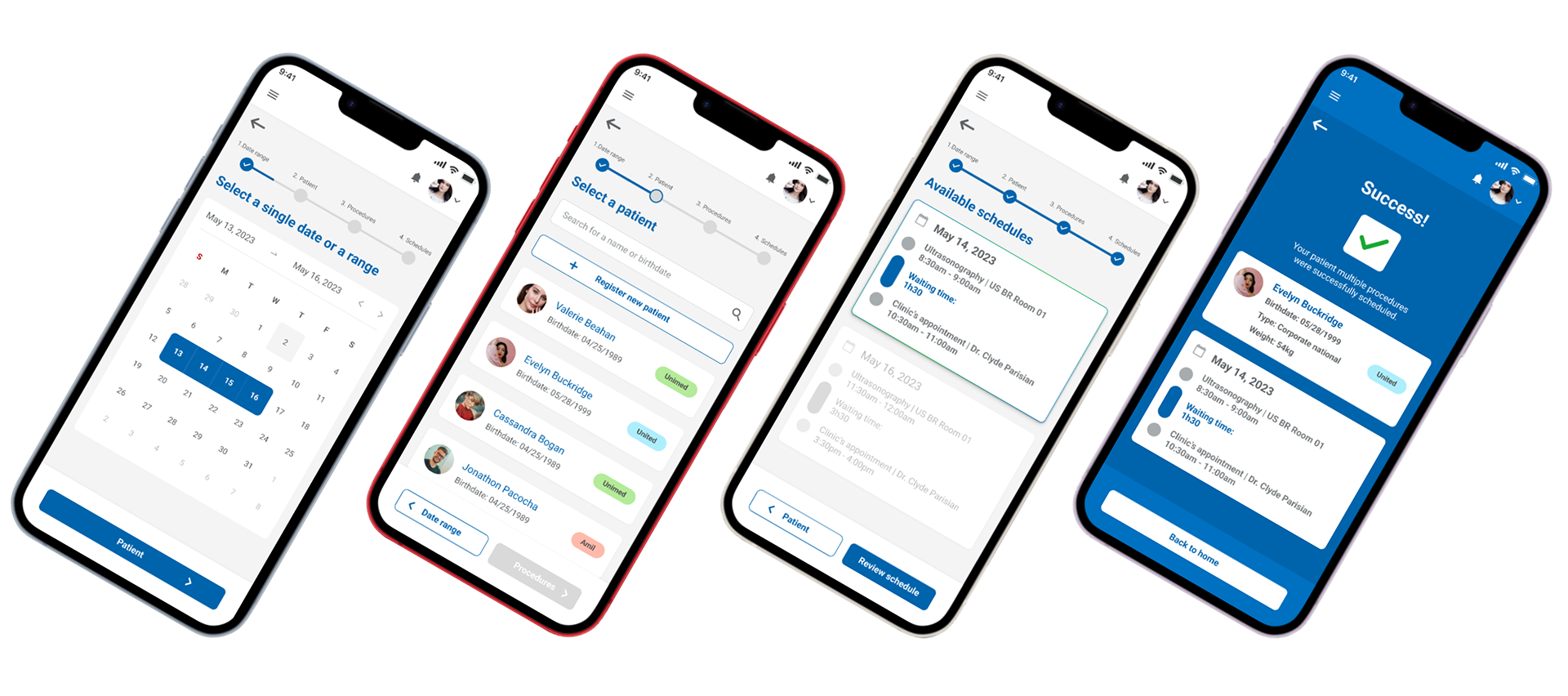
Some screenshots of the Multiple Scheduling UI
Multi-Schedule Algorithm Integration
Sisclínica’s new module introduced an algorithm that:
• Searches compatible combinations of appointments and exams
• Prioritizes same-day scheduling for traveling patients
• Optimizes doctor and equipment availability
I designed the UI around the algorithm’s output, ensuring:
• Clear display of recommended schedule bundles
• Easy comparison of scheduling alternatives
• Fast resubmission when constraints change
Wireframes, UI Design & Handoff
Deliverables included:
• Full flow mapping
• Low-fidelity wireframes to validate interactions
• High-fidelity layouts for desktop and mobile
• A complete engineering handoff with states, error logic, and component specs
This ensured technical feasibility and alignment with the algorithmic logic.
The Figma mobile prototype
Below is the live Figma prototype of the four-step multiple scheduling flow. Feel free to explore it.
What I’ve Learned
This project reinforced the importance of simplifying highly interdependent workflows through structured, step-by-step interactions. I learned how to break down complex medical scheduling logic into manageable decisions, design around algorithmic outputs, and prioritize clarity for staff working under pressure. Most importantly, I saw how UX decisions directly improve operational efficiency and patient experience, especially in contexts where resource constraints are real.


